
Cross-Symbol & Multi-Timeframe
request.security() evaluates an expression in the context of a different symbol and/or timeframe, and returns the result aligned to the current chart bar. It is the primary way to access multi-timeframe (MTF) data and data from other instruments in Pine Script.
Basic Syntax
request.security(symbol, timeframe, expression, gaps, lookahead, ignore_invalid_symbol, currency)| Parameter | Type | Description |
|---|---|---|
symbol | string | Symbol identifier, e.g. "NASDAQ:AAPL" or syminfo.tickerid |
timeframe | string | Timeframe string, e.g. "D", "W", "60" |
expression | any series | Expression evaluated on the requested symbol/timeframe |
gaps | gaps_type | gaps.off (default) or gaps.on — whether to fill gaps with na |
lookahead | lookahead_type | lookahead.off (default) or lookahead.on |
ignore_invalid_symbol | bool | If true, return na instead of error for unknown symbols |
currency | string | Currency for price conversion |
Simple Examples
Higher timeframe close
//@version=6
indicator("Weekly Close on Daily Chart", overlay=true)

weekly_close = request.security(syminfo.tickerid, "W", close)
plot(weekly_close, "Weekly Close", color=color.blue)
Another symbol
//@version=6
indicator("SPY on AAPL chart", overlay=false)

spy_close = request.security("AMEX:SPY", "D", close)
plot(spy_close)
Higher timeframe indicator
//@version=6
indicator("Weekly RSI")

weekly_rsi = request.security(syminfo.tickerid, "W", ta.rsi(close, 14))
plot(weekly_rsi)
hline(70)
hline(30)
Timeframe Strings
| String | Meaning |
|---|---|
"1", "5", "15", "60" | Minutes |
"D" | Daily |
"W" | Weekly |
"M" | Monthly |
"3M", "6M" | Multi-month |
Use timeframe.period to reference the chart's own timeframe.
Gaps
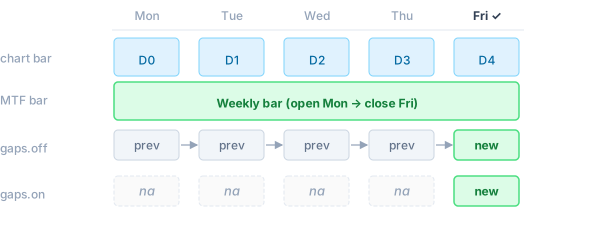
When the requested timeframe is higher than the chart timeframe, a new higher-TF bar closes less frequently than the chart advances.
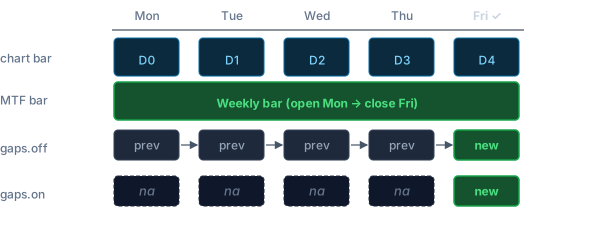
gaps.off(default): the last known value is carried forward — the series has nonavalues between higher-TF bar closes.gaps.on: anais emitted for every chart bar where the higher-TF bar has not yet closed.
// Carry-forward (default): weekly_close is always defined
weekly_close = request.security(syminfo.tickerid, "W", close)

// Gap-fill: na on all days except Friday (when the weekly bar closes)
weekly_close_gaps = request.security(syminfo.tickerid, "W", close, gaps=gaps.on)
Lookahead
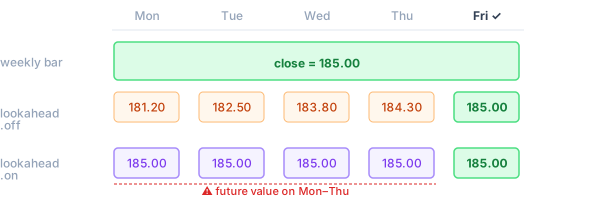
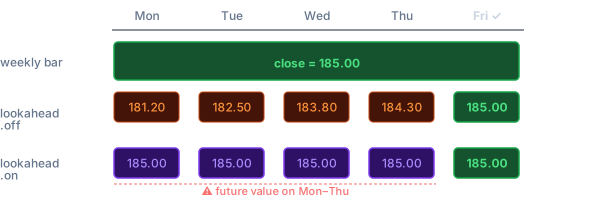
lookahead.on makes the expression see the final value of the higher-TF bar from the very first chart bar within that period, rather than the still-forming value. This can introduce future leak into historical bars — only use it when intentional.
// Default: sees the forming weekly close (updates throughout the week)
weekly_open = request.security(syminfo.tickerid, "W", open)

// With lookahead: sees the confirmed weekly open immediately on Monday
weekly_open_confirmed = request.security(syminfo.tickerid, "W", open, lookahead=lookahead.on)
var and varip Variables
var and varip variables cannot be declared inside the expression argument. To accumulate state across bars on the requested timeframe, declare the variable at the top level of the script. The sub-instance runs the full program body on the requested symbol/timeframe, so top-level var state is maintained per call site independently of the main chart:
//@version=6
indicator("Cumulative Volume (Weekly)")

// Declared at top level — the sub-instance accumulates this on weekly bars
var float cum = 0.0
cum += volume

weekly_cum_vol = request.security(syminfo.tickerid, "W", cum)
plot(weekly_cum_vol)
Each request.security call site has an isolated sub-instance — its var state is independent of the main script and of other request.security calls.
Tuples
An expression can return multiple values as a tuple:
//@version=6
indicator("Weekly OHLC")

[w_open, w_high, w_low, w_close] =
    request.security(syminfo.tickerid, "W", [open, high, low, close])

plotcandle(w_open, w_high, w_low, w_close)
ignore_invalid_symbol
Use this flag when the symbol might not exist in the data provider:
price = request.security("SOME:SYMBOL", "D", close, ignore_invalid_symbol=true)
// price is na if the symbol is not recognised; no runtime error is raised
Without this flag, an unrecognised symbol raises a runtime error and halts execution.
request.security_lower_tf
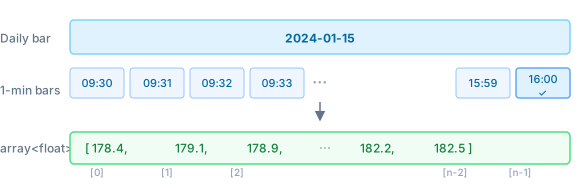
For lower timeframes, use request.security_lower_tf. It returns an array<T> containing every sub-bar value within the current chart bar, in ascending order:
//@version=6
indicator("Intraday highs on Daily chart")

// Returns an array of all 1-minute highs within each daily bar
minute_highs = request.security_lower_tf(syminfo.tickerid, "1", high)

// Highest 1-minute high within the current daily bar
intraday_high = array.max(minute_highs)
plot(intraday_high)
The array is empty (array.size() == 0) for bars where no sub-bars are available.
Ticker Expressions
A ticker expression is a string that combines multiple symbols using arithmetic operators. OpenPine decomposes it into individual DataProvider requests, evaluates the expression per bar, and returns the result as a single series.
Supported operators
| Operator | Example | Result |
|---|---|---|
* | "AAPL*2" | symbol value × scalar |
/ | "AAPL/SPY" | ratio between two symbols |
+ | "AAPL+MSFT" | sum of two symbols |
- | "AAPL-MSFT" | difference of two symbols |
Operands can be symbol strings ("EXCHANGE:TICKER") or numeric literals. Standard operator precedence applies; use parentheses if needed.
Examples
Weighted blend (50/50 portfolio)
blend = request.security("NASDAQ:AAPL*0.5+AMEX:SPY*0.5", "D", close)Relative performance (ratio)
// AAPL price relative to SPY — how many SPY shares does one AAPL buy?
ratio = request.security("NASDAQ:AAPL/AMEX:SPY", "D", close)
plot(ratio)
Spread (difference)
// Gold/Silver spread
spread = request.security("COMEX:GC1!/COMEX:SI1!", "D", close)
plot(spread)
Multi-symbol index
// Equal-weight average of four tech stocks
tech = request.security(
    "NASDAQ:AAPL*0.25+NASDAQ:MSFT*0.25+NASDAQ:GOOGL*0.25+NASDAQ:AMZN*0.25",
    "D", close)
plot(tech)
How it works
For an expression like "AAPL*0.5+SPY*0.5", OpenPine:
- Extracts each symbol (
AAPL,SPY) and fetches their candlestick data viaDataProvider. - On each bar, evaluates the arithmetic expression using the requested
expressionfield (e.g.close) from each symbol's sub-instance. - Returns the computed scalar result aligned to the chart bar.
Each symbol in the expression is subject to the same max_security_calls limit as a regular request.security call.
Limitations
- Nesting depth: by default, an expression inside
request.securitymay itself callrequest.securityup to 3 levels deep (configurable viaExecutionLimits::max_security_depth). - Call site limit: each unique
(symbol, timeframe)pair counts towardExecutionLimits::max_security_calls(default 40).
See Also
- Data Providers — supplying candlestick data for
request.security() - Security & Limits — nesting depth and call count limits